> ## Documentation Index
> Fetch the complete documentation index at: https://proxy-docs.permify.co/llms.txt
> Use this file to discover all available pages before exploring further.
# Check Access Control
In Permify, you can perform two different types access checks,
* **resource based** authorization checks, structured in the following form: `Can user U perform action Y in resource Z ?`
* **subject based** authorization checks, structured in the following form: `Which resources can user U edit ?`
In this section we'll look at the resource based check request of Permify.
You can find subject based access checks in [Entity (Data) Filtering] section.
[Entity (Data) Filtering]: ./lookup-entity
## Content
* [Example Check Requests](#example-check-requests)
* [Resource Based Access Check (Relationships)](#resource-based-check-relationships)
* [Attribute Based Access Check With Context Data](#attribute-based-abac-check-with-context-data)
* [How Access Decisions Evaluated?](#how-access-decisions-evaluated)
* [Latency & Performance](#latency-and-performance)
* [Parameters & Properties](#parameters-and-properties)
## Example Check requests
### Resource Based Check (Relationships)
```javascript theme={null}
POST /v1/tenants/{tenant_id}/permissions/check
```
```go theme={null}
cr, err: = client.Permission.Check(context.Background(), &v1.PermissionCheckRequest {
TenantId: "t1",
Metadata: &v1.PermissionCheckRequestMetadata {
SnapToken: "",
SchemaVersion: "",
Depth: 20,
},
Entity: &v1.Entity {
Type: "repository",
Id: "1",
},
Permission: "edit",
Subject: &v1.Subject {
Type: "user",
Id: "1",
},
if (cr.can === PermissionCheckResponse_Result.RESULT_ALLOWED) {
// RESULT_ALLOWED
} else {
// RESULT_DENIED
}
})
```
```javascript theme={null}
client.permission.check({
tenantId: "t1",
metadata: {
snapToken: "",
schemaVersion: "",
depth: 20
},
entity: {
type: "repository",
id: "1"
},
permission: "edit",
subject: {
type: "user",
id: "1"
}
}).then((response) => {
if (response.can === PermissionCheckResponse_Result.RESULT_ALLOWED) {
console.log("RESULT_ALLOWED")
} else {
console.log("RESULT_DENIED")
}
})
```
```python theme={null}
with permify.ApiClient(configuration) as api_client:
api_instance = permify.PermissionApi(api_client)
tenant_id = 't1'
body = PermissionsCheckRequest(
tenant_id=tenant_id,
metadata={
"snapToken": "",
"schemaVersion": "",
"depth": 20
},
entity={
"type": "repository",
"id": "1"
},
permission="edit",
subject={
"type": "user",
"id": "1"
}
)
try:
api_response = api_instance.permissions_check(tenant_id, body)
if api_response.can == PermissionCheckResponse.Result.RESULT_ALLOWED:
print("RESULT_ALLOWED")
else:
print("RESULT_DENIED")
except ApiException as e:
print(f"Exception permissions_check: {e}")
```
```curl theme={null}
curl --location --request POST 'localhost:3476/v1/tenants/{tenant_id}/permissions/check' \
--header 'Content-Type: application/json' \
--data-raw '{
"metadata":{
"snap_token": "",
"schema_version": "",
"depth": 20
},
"entity": {
"type": "repository",
"id": "1"
},
"permission": "edit",
"subject": {
"type": "user",
"id": "1",
"relation": ""
},
}'
```
### Attribute Based (ABAC) Check With Context Data
```javascript theme={null}
client.permission.check({
tenantId: "t1",
metadata: {
snapToken: "",
schemaVersion: "",
depth: 20,
},
entity: {
type: "organization",
id: "1",
},
permission: "hr_manager",
subject: {
type: "user",
id: "1",
},
context: {
data: {
ip_address: "192.158.1.38",
},
},
}).then((response) => {
if (response.can === PermissionCheckResponse_Result.RESULT_ALLOWED) {
console.log("RESULT_ALLOWED");
} else {
console.log("RESULT_DENIED");
}
});
```
## How Access Decisions Evaluated?
Access decisions are evaluated by stored [relational tuples] and your authorization model, [Permify Schema].
In high level, access of an subject related with the relationships or attributes created between the subject and the resource. You can define this data in Permify Schema then create and store them as relational tuples and attributes, which is basically forms your authorization data.
Permify Engine to compute access decision in 2 steps,
1. Looking up authorization model for finding the given action's ( **edit**, **push**, **delete** etc.) relations.
2. Walk over a graph of each relation to find whether given subject ( user or user set ) is related with the action.
Let's turn back to above authorization question ( ***"Can the user 3 edit document 12 ?"*** ) to better understand how decision evaluation works.
[relational tuples]: ../../getting-started/sync-data.md
[Permify Schema]: ../../getting-started/modeling.md
When Permify Engine receives this question it directly looks up to authorization model to find document `edit` action. Let's say we have a model as follows
```perm theme={null}
entity user {}
entity organization {
// organizational roles
relation admin @user
relation member @user
}
entity document {
// represents documents parent organization
relation parent @organization
// represents owner of this document
relation owner @user
// permissions
action edit = parent.admin or owner
action delete = owner
}
```
Which has a directed graph as follows:
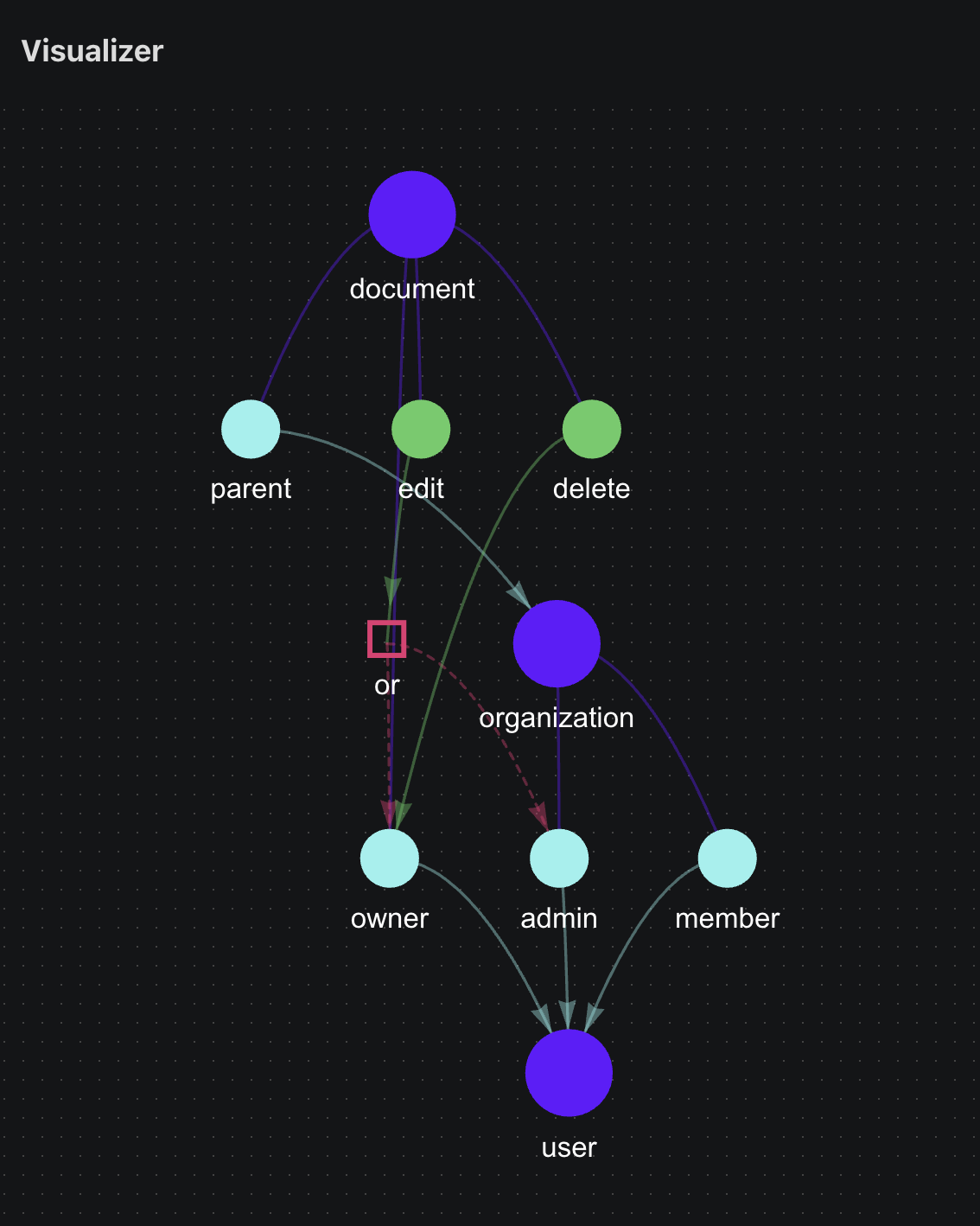
As we can see above: only users with an admin role in an organization, which `document:12` belongs, and owners of the `document:12` can edit. Permify runs two concurrent queries for **parent.admin** and **owner**:
**Q1:** Get the owners of the `document:12`.
**Q2:** Get admins of the organization where `document:12` belongs to.
Since edit action consist **or** between owner and parent.admin, if Permify Engine found user:3 in results of one of these queries then it terminates the other ongoing queries and returns authorized true to the client.
Rather than **or**, if we had an **and** relation then Permify Engine waits the results of these queries to returning a decision.
## Latency & Performance
With the right architecture we expect **7-12 ms** latency. Depending on your load, cache usage and architecture you can get up to **30ms**.
Permify implements several cache mechanisms in order to achieve low latency in scaled distributed systems. See more on the section [Cache Mechanisims](../../operations/cache)
## Parameters & Properties
## OpenAPI
````yaml post /v1/tenants/{tenant_id}/permissions/check
openapi: 3.0.0
info:
title: Permify API
description: >-
Permify is an open source authorization service for creating fine-grained
and scalable authorization systems.
version: v1.7.2
contact:
name: API Support
url: https://github.com/Permify/permify/issues
email: hello@permify.co
license:
name: AGPL-3.0 license
url: https://github.com/Permify/permify/blob/master/LICENSE
servers: []
security: []
tags:
- name: Permission
- name: Watch
- name: Schema
- name: Data
- name: Bundle
- name: Tenancy
paths:
/v1/tenants/{tenant_id}/permissions/check:
post:
tags:
- Permission
summary: check api
operationId: permissions.check
parameters:
- name: tenant_id
description: >-
Identifier of the tenant, if you are not using multi-tenancy (have
only one tenant) use pre-inserted tenant t1 for this
field. Required, and must match the pattern \“[a-zA-Z0-9-,]+\“, max
64 bytes.
in: path
required: true
schema:
type: string
requestBody:
content:
application/json:
schema:
$ref: '#/components/schemas/CheckBody'
required: true
responses:
'200':
description: A successful response.
content:
application/json:
schema:
$ref: '#/components/schemas/PermissionCheckResponse'
default:
description: An unexpected error response.
content:
application/json:
schema:
$ref: '#/components/schemas/Status'
x-codeSamples:
- label: go
lang: go
source: >-
cr, err := client.Permission.Check(context.Background(),
&v1.PermissionCheckRequest {
TenantId: "t1",
Metadata: &v1.PermissionCheckRequestMetadata {
SnapToken: "",
SchemaVersion: "",
Depth: 20,
},
Entity: &v1.Entity {
Type: "repository",
Id: "1",
},
Permission: "edit",
Subject: &v1.Subject {
Type: "user",
Id: "1",
},
})
if cr.Can == v1.PermissionCheckResponse_Result_RESULT_ALLOWED {
// RESULT_ALLOWED
} else {
// RESULT_DENIED
}
- label: node
lang: javascript
source: |-
client.permission.check({
tenantId: "t1",
metadata: {
snapToken: "",
schemaVersion: "",
depth: 20
},
entity: {
type: "repository",
id: "1"
},
permission: "edit",
subject: {
type: "user",
id: "1"
}
}).then((response) => {
if (response.can === PermissionCheckResponse_Result.RESULT_ALLOWED) {
console.log("RESULT_ALLOWED")
} else {
console.log("RESULT_DENIED")
}
})
- label: cURL
lang: curl
source: >-
curl --location --request POST
'localhost:3476/v1/tenants/{tenant_id}/permissions/check' \
--header 'Content-Type: application/json' \
--data-raw '{
"metadata": {
"snap_token": "",
"schema_version": "",
"depth": 20
},
"entity": {
"type": "repository",
"id": "1"
},
"permission": "edit",
"subject": {
"type": "user",
"id": "1",
"relation": ""
}
}'
components:
schemas:
CheckBody:
type: object
properties:
metadata:
$ref: '#/components/schemas/PermissionCheckRequestMetadata'
entity:
$ref: '#/components/schemas/Entity'
permission:
type: string
description: The action the user wants to perform on the resource
subject:
$ref: '#/components/schemas/Subject'
context:
$ref: '#/components/schemas/Context'
arguments:
type: array
items:
$ref: '#/components/schemas/Argument'
description: Additional arguments associated with this request.
description: >-
PermissionCheckRequest is the request message for the Check method in
the Permission service.
PermissionCheckResponse:
type: object
properties:
can:
$ref: '#/components/schemas/CheckResult'
metadata:
$ref: '#/components/schemas/PermissionCheckResponseMetadata'
description: >-
PermissionCheckResponse is the response message for the Check method in
the Permission service.
Status:
type: object
properties:
code:
type: integer
format: int32
message:
type: string
details:
type: array
items:
$ref: '#/components/schemas/Any'
PermissionCheckRequestMetadata:
type: object
properties:
schema_version:
type: string
description: Version of the schema.
snap_token:
type: string
description: >-
The snap token to avoid stale cache, see more details on [Snap
Tokens](../../operations/snap-tokens)
depth:
type: integer
format: int32
description: Query limit when if recursive database queries got in loop
description: PermissionCheckRequestMetadata metadata for the PermissionCheckRequest.
Entity:
type: object
properties:
type:
type: string
id:
type: string
description: Entity represents an entity with a type and an identifier.
Subject:
type: object
properties:
type:
type: string
id:
type: string
relation:
type: string
description: >-
Subject represents an entity subject with a type, an identifier, and a
relation.
Context:
type: object
properties:
tuples:
type: array
items:
$ref: '#/components/schemas/Tuple'
description: A repeated field of tuples involved in the operation.
attributes:
type: array
items:
$ref: '#/components/schemas/Attribute'
description: A repeated field of attributes associated with the operation.
data:
type: object
description: Additional data associated with the context.
description: |-
Context encapsulates the information related to a single operation,
including the tuples involved and the associated attributes.
Argument:
type: object
properties:
computedAttribute:
$ref: '#/components/schemas/ComputedAttribute'
description: >-
Argument defines the type of argument in a Call. It can be either a
ComputedAttribute or a ContextAttribute.
CheckResult:
type: string
enum:
- CHECK_RESULT_UNSPECIFIED
- CHECK_RESULT_ALLOWED
- CHECK_RESULT_DENIED
default: CHECK_RESULT_UNSPECIFIED
description: |-
Enumerates results of a check operation.
- CHECK_RESULT_UNSPECIFIED: Not specified check result. This is the default value.
- CHECK_RESULT_ALLOWED: Represents a successful check (the check allowed the operation).
- CHECK_RESULT_DENIED: Represents a failed check (the check denied the operation).
PermissionCheckResponseMetadata:
type: object
properties:
check_count:
type: integer
format: int32
description: The count of the checks performed.
description: >-
PermissionCheckResponseMetadata metadata for the
PermissionCheckResponse.
Any:
type: object
properties:
'@type':
type: string
description: >-
A URL/resource name that uniquely identifies the type of the
serialized
protocol buffer message. This string must contain at least
one "/" character. The last segment of the URL's path must represent
the fully qualified name of the type (as in
`path/google.protobuf.Duration`). The name should be in a canonical
form
(e.g., leading "." is not accepted).
In practice, teams usually precompile into the binary all types that
they
expect it to use in the context of Any. However, for URLs which use
the
scheme `http`, `https`, or no scheme, one can optionally set up a
type
server that maps type URLs to message definitions as follows:
* If no scheme is provided, `https` is assumed.
* An HTTP GET on the URL must yield a [google.protobuf.Type][]
value in binary format, or produce an error.
* Applications are allowed to cache lookup results based on the
URL, or have them precompiled into a binary to avoid any
lookup. Therefore, binary compatibility needs to be preserved
on changes to types. (Use versioned type names to manage
breaking changes.)
Note: this functionality is not currently available in the official
protobuf release, and it is not used for type URLs beginning with
type.googleapis.com. As of May 2023, there are no widely used type
server
implementations and no plans to implement one.
Schemes other than `http`, `https` (or the empty scheme) might be
used with implementation specific semantics.
additionalProperties: {}
description: >-
`Any` contains an arbitrary serialized protocol buffer message along
with a
URL that describes the type of the serialized message.
Protobuf library provides support to pack/unpack Any values in the form
of utility functions or additional generated methods of the Any type.
Example 1: Pack and unpack a message in C++.
Foo foo = ...;
Any any;
any.PackFrom(foo);
...
if (any.UnpackTo(&foo)) {
...
}
Example 2: Pack and unpack a message in Java.
Foo foo = ...;
Any any = Any.pack(foo);
...
if (any.is(Foo.class)) {
foo = any.unpack(Foo.class);
}
// or ...
if (any.isSameTypeAs(Foo.getDefaultInstance())) {
foo = any.unpack(Foo.getDefaultInstance());
}
Example 3: Pack and unpack a message in Python.
foo = Foo(...)
any = Any()
any.Pack(foo)
...
if any.Is(Foo.DESCRIPTOR):
any.Unpack(foo)
...
Example 4: Pack and unpack a message in Go
foo := &pb.Foo{...}
any, err := anypb.New(foo)
if err != nil {
...
}
...
foo := &pb.Foo{}
if err := any.UnmarshalTo(foo); err != nil {
...
}
The pack methods provided by protobuf library will by default use
'type.googleapis.com/full.type.name' as the type URL and the unpack
methods only use the fully qualified type name after the last '/'
in the type URL, for example "foo.bar.com/x/y.z" will yield type
name "y.z".
JSON
====
The JSON representation of an `Any` value uses the regular
representation of the deserialized, embedded message, with an
additional field `@type` which contains the type URL. Example:
package google.profile;
message Person {
string first_name = 1;
string last_name = 2;
}
{
"@type": "type.googleapis.com/google.profile.Person",
"firstName": ,
"lastName":
}
If the embedded message type is well-known and has a custom JSON
representation, that representation will be embedded adding a field
`value` which holds the custom JSON in addition to the `@type`
field. Example (for message [google.protobuf.Duration][]):
{
"@type": "type.googleapis.com/google.protobuf.Duration",
"value": "1.212s"
}
Tuple:
type: object
properties:
entity:
$ref: '#/components/schemas/Entity'
relation:
type: string
subject:
$ref: '#/components/schemas/Subject'
description: Tuple is a structure that includes an entity, a relation, and a subject.
Attribute:
type: object
properties:
entity:
$ref: '#/components/schemas/Entity'
attribute:
type: string
title: Name of the attribute
value:
$ref: '#/components/schemas/Any'
description: >-
Attribute represents an attribute of an entity with a specific type and
value.
ComputedAttribute:
type: object
properties:
name:
type: string
title: Name of the computed attribute
description: ComputedAttribute defines a computed attribute which includes its name.
````